
Cross hypervisor disaster recovery provides the ability to migrate VMs from one hypervisor to another (ESXi to AHV or AHV to ESXi) by using protection domain.
Some of the requirements:
- Only VM Flat files are supported, vm snapshots or delta disks are not supported
- VMs with attached volume groups or shared disk not supported
- Different version of AOS is supported
- NGT need should be installed on all the VMs.
Creating Protection Domain:
- Login to Web Console
- Click Main Menu à Data Protection

If DR Site is not added, click Remote Site à Physical Cluster to add the remote site.
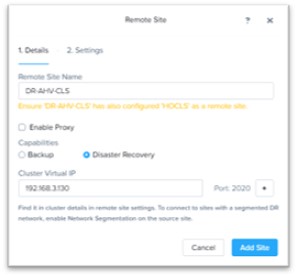
Provide Remote Site name and remote cluster Virtual IP and click add site.
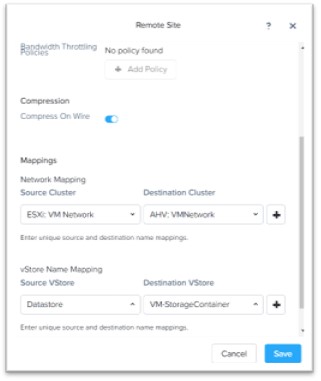
Map Source and Destination Network & Datastore as per requirement and click Save

Remote Site Connection is creation, let proceed to setup AsyncDR.
Note: For Cross Hypervisor replication, minimum RPO is 1 hours.

Click Protection Domain à Async DR to create protection domain.
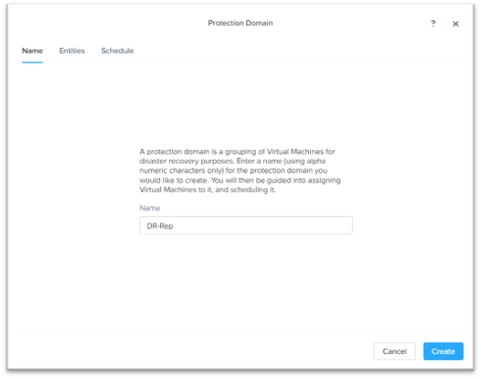
Provide Protection Domain Name and click Create

Select the VMs / Object to protect and Click Protect Selected Entries

Once desired VMs are selected click next
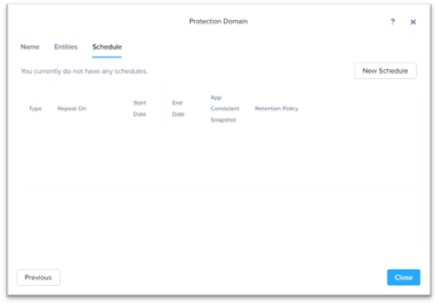
Click New Schedule to create the Schedule.

Specify schedule and retention on local, DR Clusters and click Create Schedule.

Once Schedule is created. Click Close
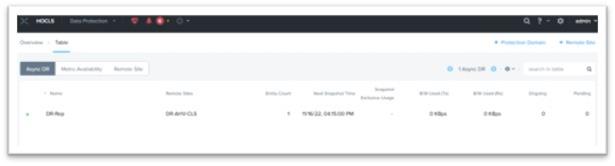
 The Hyperconverged Perspective