
Rubrik Supports Nutanix AHV Backups. In the current Rubrik release configuring Rubrik AHV backup are like 5min job or piece of cake.
In today article I will show how to add Nutanix AHV Cluster in Rubrik as Backup Source.
Click on the gear icon à on the menu select Nutanix Cluster

On Right of Page click + icon to add the Nutanix Cluster

You have to provide the below information
- Nutanix AHV Cluster IP
- Cluster UUID
- Cluster SSL Certificate
- Prism Username / Password
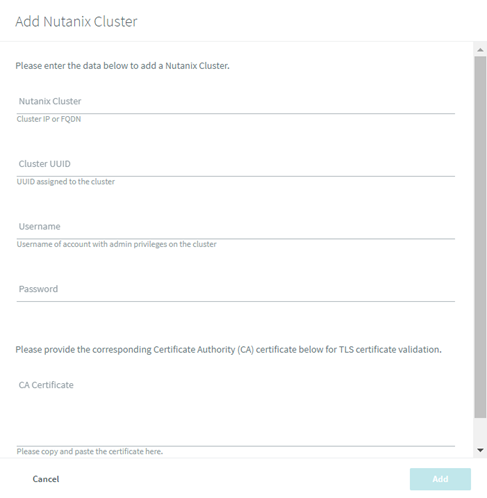
To get the Nutanix Cluster UUID & Certificate , SSH to Nutanix CVM
Run Below Command to get the Cluster UUID
NCLI Cluster info
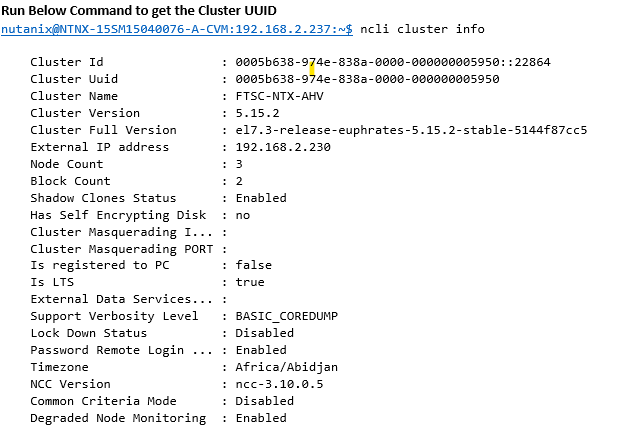
To get the Nutanix Certificate:
print ssl.get_server_certificate ((‘Prism Element IP’, 9440),ssl_version=ssl.PROTOCOL_TLSv1_2)

Click Ok to add the Nutanix Cluster. Once Nutanix Cluster is added you can proceed with VM selection and assign desire SLA.
Best Regards,
Qamar Abbas
 The Hyperconverged Perspective
Thank you very much for this guide.